Golden Ratio Face Calculator Online: How It Works and How to Check Your Ratios

If you have ever wondered how close your features come to the famous golden ratio, you are not alone. A golden ratio face calculator online turns a selfie into numbers describing how your proportions compare with phi — 1.618. But what happens behind the upload button? A calculator is not judging your appearance. It detects landmarks on your face, measures the distances between them, and compares those distances to ratios built around 1.618. Understanding that process makes the results far more meaningful, and shows you how to check many of the same ratios yourself.
What Is the Golden Ratio in Facial Analysis?
The golden ratio, phi (φ), equals about 1.618: a longer length divided by a shorter one equals their combined length divided by the longer. It appears in geometry, nature, and architecture, and artists have used it for centuries as a loose guide for pleasing composition.
In facial analysis, the golden ratio is applied to specific distances on the face — the idea being that proportions sitting near 1.618 in certain measurements read as harmonious. Some systems compare face width to face length, nose length to the nose-to-chin distance, or mouth width to nose width.
Keep this in context. The golden ratio is an interesting lens for proportions, not a definition of attractiveness. Many admired faces do not score near 1.618, and ratio-perfect faces do not exist in nature. Ordinary asymmetry is completely normal. Treat any golden ratio score as entertainment, a fun measurement exercise rather than a verdict. For the deeper background, our golden ratio face guide covers the concept’s origins.
How a Golden Ratio Face Calculator Works
A golden ratio face calculator follows a straightforward pipeline:
- Photo upload. You provide a front-facing photo — clear and well-lit, with both eyes, the nose, and the mouth visible.
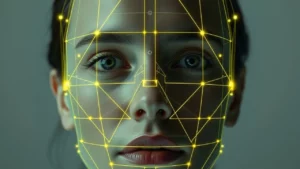
- Landmark detection. The tool scans the photo and places reference points on key features: eye corners, nose tip and base, mouth corners, chin, and jaw outline. Most modern tools use a trained model that finds these points automatically.
- Distance measurement. With landmarks placed, the tool measures the distances between them: eye width, face length, hairline-to-nose distance, and so on.
- Ratio calculation. These distances are divided against each other and compared with 1.618. A ratio of 1.6 sits very close to phi; 1.2 or 2.0 sits farther away.
- Scoring and display. The tool aggregates how close all measured ratios are to phi and shows a summary — often a percentage — plus a breakdown of individual ratios.
The process takes seconds. But result quality depends entirely on landmark placement, which is why a blurry photo, tilted head, or hair over the face produces odd numbers — our guide to taking an accurate face analysis photo covers the right setup.
The Facial Ratios a Calculator Checks
Most calculators work through a standard set of checks rather than one magic number:
Facial thirds
The face divides into three horizontal bands: hairline to brow, brow to the base of the nose, and nose base to chin. The classic rule suggests these should be roughly equal. A calculator measures each band and reports how evenly they divide. Our breakdown of facial thirds walks through each boundary.
Facial fifths
The face also divides vertically into five parts, each about one eye-width. The ears sit near the outer fifths, while nose and mouth widths are compared against the middle fifths. Our guide to facial fifths covers the individual measurements.
Overall symmetry
The tool compares the left and right halves — the same comparison a face symmetry test with a photo makes — eye size and position, cheekbone width, mouth corner placement — and reports how closely they mirror each other — a rough measure of facial symmetry. Noticeable asymmetry shifts several other ratios at once, so this is one of the most common checks.
Length-to-width and feature ratios
Many calculators add golden-ratio-specific comparisons: our facial width-to-height ratio (FWHR) calculator compares face length divided by face width; nose length relative to the nose-to-chin distance, and mouth width relative to nose width. Each is compared against 1.618.
How to Check the Ratios Yourself
You do not need a calculator to explore these proportions — a photo and a ruler will do:
Step 1: Take a suitable photo. Face the camera directly, keep a neutral expression, pull your hair back, and use even lighting. A straight-on photo matters most, because tilt distorts every distance.
Step 2: Mark the thirds. Draw horizontal lines at the hairline, brow ridge, nose base, and chin. Measure the three bands — the photo itself is your unit — and compare each pair.
Step 3: Mark the fifths. Draw vertical lines dividing the face into five columns across its widest points. Ideally each eye sits within an inner fifth, and total face width is about five eye-widths.
Step 4: Check a golden ratio pair. Measure face length (hairline to chin) and divide by face width (cheekbone to cheekbone). Then divide nose length (between the eyes to the nose base) by the nose-base-to-chin distance. Compare each result to 1.618.
Step 5: Compare symmetry. Overlay one half of the face onto the other with an image editor or folded paper. You will see where the halves differ — a slightly higher eyebrow, a wider eye. This is normal on every face.
Manual measuring is imprecise, but that is its advantage: it teaches you to see the ratios instead of just receiving a score.
Accuracy Limitations to Keep in Mind
Several factors limit accuracy, whether measured by hand or online:
- Camera and lens distortion. Smartphone cameras at close range stretch faces. A selfie at arm’s length differs from the same face photographed at three metres, and ratios shift with it.
- Head pose. A few degrees of tilt, turn, or chin movement changes measured distances. Real accuracy needs a perfectly straight-on shot.
- Landmark error. Automatic detection can misplace a point by a few pixels, and small placement errors become large ratio errors.
- Expression and muscle tension. A smile, raised eyebrows, or a clenched jaw moves landmarks and changes ratios.
- Hair, glasses, and accessories. Anything covering the forehead, ears, or jawline removes reference points the ratios depend on.
Two photos of the same person can easily produce two different scores. That inconsistency is not a flaw in the concept — it is a reminder that the result describes the photo, not the face, and certainly not the person. Treat every golden ratio number as entertainment, a curiosity to explore rather than a measurement to chase.
Frequently Asked Questions
What does a golden ratio face score actually mean?
It means measured distances on your photo produced ratios near or far from 1.618 — a description of geometry in one image, not an assessment of attractiveness. Scores vary between photos, and ordinary asymmetry is normal.
Can I improve my golden ratio score?
You can change the score by changing the photo: better lighting, a straighter pose, a camera farther from the face. The score reflects how the image was taken as much as your features, so chasing a “better” number is not worthwhile.
Are online golden ratio calculators accurate?
They are as accurate as the photo and landmark detection allow. On a good straight-on, well-lit photo they place landmarks reasonably well, but distortion, pose, and detection errors add noise. Treat results as approximate and for fun.
Why do different calculators give me different scores?
Different tools detect landmarks differently, measure different ratio sets, and combine them with different formulas. There is no single official method, so variation is expected.
Try It Yourself
If this has made you curious, try our free AI face-analysis tool on the homepage: upload a straight-on selfie and get your facial proportions — including golden ratio comparisons — with a full breakdown of each ratio.
Featured image alt text: Golden Ratio Face Calculator Online: How It Works